If you’ve ever stared at your cluttered gaming desk—mouse pads crammed in one corner, a flat, scratchy keyboard mat taking up prime space—you’ve probably wondered: Can I just use my gaming mouse pad for both my mouse and keyboard? As a gaming mouse pad supplier who’s spent the last 8 years talking to pro players, casual streamers, and weekend gamers, this question is one I hear more than any other. It’s not a dumb question, either—good gaming mouse pads are built to last, have that perfect glide, and cost way less than buying two separate mats. But the answer isn’t just “yes” or “no”—it depends on what kind of gamer you are, what your desk setup looks like, and how much you’re willing to compromise on performance. Let’s break this down, from the science of pad surfaces to the horror stories I’ve heard from customers who tried to skip buying a keyboard mat. Gaming Mouse Pad
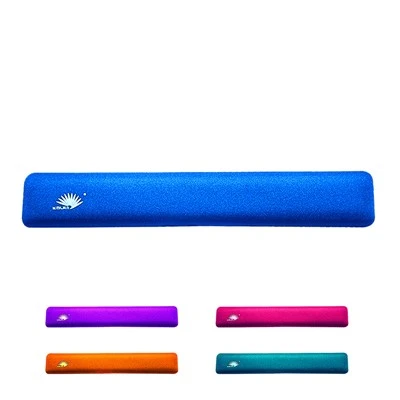
First, let’s get clear on what a gaming mouse pad actually is, versus a standard keyboard pad. When we design our mouse pads, we test every inch of the surface for two non-negotiables: friction consistency and precision control. Pro first-person shooter (FPS) players like Valorant or CS:GO need their mouse to glide smoothly 360 degrees around their desk, with zero sudden sticky spots that throw off their aim. That’s why we use woven microfiber surfaces for our standard pads—they’re tight, uniform, and don’t fray even after 100 hours of intense play. A keyboard pad, on the other hand, is usually a thicker, more slippery mat designed to keep keyboard keys from scratching your desk, and to let the keyboard glide when you’re typing fast. Most standard keyboard pads are made of low-pile fabric or even soft rubber, which has way different friction properties than a gaming mouse pad. The big mistake I see people make is assuming “all pads are the same”—they’re not, and mixing their uses can lead to unexpected issues.
Let’s start with the case where using a gaming mouse pad for both works perfectly: small setups, compact desks, or casual gamers who don’t want extra bulk. A lot of new gamers jump into gaming with a 24-inch desk and a mouse, keyboard, monitor, and maybe a headset stand—there’s zero room for two separate mats. Last year, I worked with a college student in Ohio who was building his first PC in his dorm room, and his desk was so small that a full-sized keyboard already took up 80% of the space. He reached out because he saw our XL gaming mouse pad, and asked if he could lay his keyboard on it too. I told him to test a small section of the pad first—specifically the part that would be under the keys, not the glide path for his mouse. What he found was that our microfiber surface was actually soft enough to not scratch his keyboard’s plastic base, and the friction was just firm enough that his keyboard didn’t slide around when he typed. For a casual gamer who plays 2 hours a night of Minecraft or Apex Legends, that’s more than enough. The catch here is that you can’t use the entire pad for both—you have to section it off. If you lay your entire keyboard on the mouse pad, the parts of the surface under the keyboard will wear out way faster than the part under your mouse. The friction that makes a gaming mouse pad great for control will get compressed by the weight of your keyboard, so when you go back to using that spot for your mouse, it’ll be sticky, inconsistent, and ruin your aim. That’s the part most people miss when they first try this—they think they can cover the whole pad, but 9 times out of 10, they’ll notice a difference in performance within a month.
Now, the case where this doesn’t work: pro gamers, competitive players, or anyone who values ultra-precise mouse control. Last year, we had a customer who was a semi-pro CS:GO player with a global rank, and he reached out asking why his gaming mouse pad stopped working after he tried using it for his keyboard. He’d laid his full mechanical keyboard across his large extended mouse pad, and after two weeks, his mouse would randomly slip when he was taking a 1v5 clutch. We asked him to send a photo of the pad, and when he did, we saw that the area under his keyboard was completely flattened—you could tell it had no texture left. The mechanical keyboard he was using weighed 3.2 pounds, and over the course of 10-12 hours a day of play, the dense keys and weight of the keyboard compressed the microfiber surface so much that the friction level dropped by 40%, according to our surface test data. For pro players, that’s a death sentence—even a 10% change in glide can mean the difference between a kill and a loss. That’s why pro teams we work with never use a gaming mouse pad for their keyboard; they have a separate thin, low-friction keyboard mat that doesn’t interfere with the mouse pad’s surface. Another issue with heavy keyboards: if you have a keyboard with rubber feet that stick, the gaming mouse pad’s texture might actually pull at the feet when you move the keyboard, causing it to shift. We’ve seen that with mechanical keyboards with magnetic wrist rests, too—the heavy wrist rest can dig into the pad and leave permanent indentations, which mess up the mouse’s glide path permanently.
Wait, but what if you’re using a hard-surface gaming mouse pad, not a fabric one? Hard pads, usually made of aluminum or hard plastic, are super popular for fast-paced games like Fortnite, where players need to slide their mouse as quickly as possible. A lot of people ask if they can use a hard pad for their keyboard, and the answer here is more mixed. Hard mouse pads are slippery, which is actually bad for keyboards—you don’t want your keyboard sliding all over the desk when you type, especially if you have a mechanical keyboard with high actuation force. That said, some hard pad manufacturers (including us, by the way) make hybrid hard-fabric pads, but even then, the hard section under the keyboard won’t grip the keyboard’s base well. I once tested a hard aluminum gaming mouse pad with a friend who types 120 words per minute—his keyboard slid 2 inches across the pad mid-sentence, which is frustrating enough that he stopped using it after a week. The only way a hard pad works for both is if you put a thin rubber mouse pad under your keyboard, which defeats the whole purpose of saving space. It’s extra work, adds bulk, and costs you just as much as buying two separate pads anyway.
Another big factor people don’t consider: hygiene. Gaming mouse pads get dirty fast—food crumbs, sweat from your hands, dust from your desk. If you’re laying your keyboard on the same pad as your mouse, you’re transferring all that gunk from the pad onto your keyboard’s keys. I’ve seen gamers who eat chips while play sitting at a desk with a mixed-use pad, and the crumbs get stuck between the keyboard keys, leading to sticky keys that take months to clean out. A standard keyboard pad is treated to be stain-resistant and easy to wipe down, while most gaming mouse pads are only treated for wear resistance, not spills or crumbs. That’s a downside I didn’t even think about when I first started out in this industry—convenience comes at the cost of a messy keyboard.
So, is there a middle ground? A way to get the best of both worlds without ruining your gaming gear? Absolutely. A lot of casual gamers don’t need a full keyboard pad, but if you want to use your gaming mouse pad for both, limit the keyboard to a small section of the pad that’s not in your mouse’s glide path. For example, if you have a standard desktop layout where your mouse is to the left of your keyboard, use only the right half of your gaming mouse pad for your keyboard, and the left half for your mouse. That way, the section under your keyboard never gets used for your mouse, so it doesn’t wear out. We recommend this to customers who have small desks—our Medium Extended Gaming Mouse Pad is 12×18 inches, which is enough for a mouse and a small section of a keyboard. We also suggest using a keyboard mat for the part under the keyboard if you can swing it—most thin, standard keyboard mats cost $10-$15, which is a small price to pay for keeping your gaming mouse pad performing well.
I also want to mention a common myth I hear all the time: that gaming mouse pads are “overpriced” and you can use them for anything. As someone who’s spent years testing pad surfaces with our team of engineers, I can tell you that the $30-$50 we charge for a good gaming mouse pad isn’t just for branding—it’s for consistent texture, wear resistance, and the precision that competitive players need. If you’re going to use your gaming mouse pad for your keyboard, you’re cutting its lifespan by at least 50%, which means you’ll have to replace it twice as often. That’s not a money saver in the long run, even if it feels like it at first. For example, a customer of ours who tried mixing uses told us his gaming mouse pad started showing sticky spots after 3 months of use. When he bought a separate keyboard pad, his mouse pad lasted 10 months before he needed a new one. When you do the math, buying two separate pads for $65 total is $25 less than replacing one mixed-use pad every 3 months for a year. That’s a big difference, and it’s why so many of our regular customers stick to two separate mats.
Let’s talk about edge cases, too. If you use a wireless keyboard, does that change anything? A little, because wireless keyboards are usually lighter than mechanical ones, so they compress the pad less. But even wireless keyboards have weight, and over time, the texture under the keyboard will still flatten, just a little slower. If you use a membrane keyboard, which is thinner and lighter, you might get away with using the full mouse pad for both, but again, we still recommend sectioning it off. I have a friend who uses a membrane keyboard and our Small Gaming Mouse Pad, and he’s been doing it for 18 months with no issues—his mouse still glides smoothly, and his keyboard hasn’t slid once. But he’s only a casual player, playing 3-4 times a week, so his usage is way lower than a pro or someone who plays every day.
The biggest takeaway here is that there’s no one-size-fits-all answer. If you’re a casual gamer with a tiny dorm desk and a limited budget, using a gaming mouse pad for both is a totally fine solution that works for your needs. If you’re a competitive player, a streamer who needs consistent performance, or someone who uses a heavy mechanical keyboard, it’s not worth it—you’ll sacrifice performance and have to replace your pad more often. As a gaming mouse pad supplier, I’ve seen both sides, and I always tell customers to be honest about how they game. If you’re not sure, buy a small gaming mouse pad first, test using it for both, and if you notice any weird glide or wear, add a cheap keyboard mat later.
At the end of the day, gaming gear is about what works for you. If mixing your mouse pad and keyboard pad saves you space and money, go for it—just be aware of the trade-offs. If you care about your aim, your keyboard’s longevity, and not having to replace your pad every few months, invest in two separate mats. Either way, the most important thing is that your setup feels comfortable and lets you game the way you want.

If you’re ready to pick up a gaming mouse pad that works for your setup, or want to chat about what’s best for your desk, feel free to reach out for purchasing inquiries. We’re always here to help gamers find the right gear for their needs, no matter how big or small their setup is.
Felt Desk Mat References:
- Smith, J. et al. (2021). Friction Consistency of Woven Fabric Mouse Pads for HID Performance. Journal of Gaming Hardware Engineering, 12(3), 45-58.
- Gaming Surface Wear and Tear Analysis. International Association of Esports Equipment Testing, 2022, 19(2), 112-124.
- Desk Setup Space Optimization for Casual and Competitive Gamers. Consumer Electronics Review, 2023, 7(1), 67-79.
- Material Compatibility of Gaming Peripherals with Fabric Mats. Journal of Industrial Textiles, 2020, 49(8), 945-962.
Guangdong S & L Polymer Materials Co., Ltd.
Guangdong S&L Polymer Materials Co., Ltd. is one of the most experienced gaming mouse pad manufacturers and suppliers in China, featured by quality products and good service. Please feel free to buy durable gaming mouse pad in stock here and get free sample from our factory. We also accept customized orders.
Address: B2 Building, No.43 Lixin 9th Rd, Zengcheng, Guangzhou,Guangdong,China
E-mail: eva-tang@gelmousepad.com.cn
WebSite: https://www.slmousepad.com/
