As a travel adapter supplier who’s spent years troubleshooting everything from phone chargers to lab equipment, one question I get at least a dozen times a week is: “Can I use a travel adapter for a scanner?” It’s a deceptively simple query—so many travelers underestimate how much their office or home tech relies on more than just plug shape compatibility. I’ve seen people grab a generic adapter before a work trip, plug in their document scanner, and then spend hours in a foreign hotel room panicking when it won’t turn on, or worse, frying the scanner’s power supply. Let’s break this down the way I do with every customer who walks into my store or DMs me: no jargon, just real, tested facts. Travel Adapters

First, let’s get clear on what a travel adapter actually is. A lot of folks mix up “travel adapter” with “voltage converter,” and that’s the #1 mistake here. A travel adapter is a little plastic or rubber device that only changes the shape of the plug so it fits into a foreign wall outlet. It doesn’t do anything to adjust the electrical current—so if the U.S. runs on 120V and France runs on 230V, a basic travel adapter won’t fix that; it’ll just let your U.S. plug slide into a French outlet. A voltage converter, on the other hand, adjusts the voltage to match your device’s needs, but that’s a separate product—one I often recommend with scanners, but not the same as an adapter.
Now, scanners are not like your phone charger or your laptop brick. Those are “switching power supplies” these days—they’re built to handle a range of voltages, usually 100V to 240V, and they adjust automatically for whatever the wall throws at them. A lot of people’s phone chargers will say “Input: 100-240V ~ 50/60Hz” right on the brick, which means they’re good to go anywhere, no extra parts needed. Scanners? Most older models, and even some mid-range ones, have fixed power supplies, not switching ones. I’ve tested this with a dozen different scanner brands—Epson, Canon, HP, even some office-specific ones like Fujitsu. If your scanner’s power brick says something like “Input: 120V ~ 60Hz,” that’s a fixed-voltage unit. That means if you plug it into a 230V outlet with only a travel adapter, you’re going to blow the internal fuse, or worse, damage the scanner’s circuit board. I’ve had three customers bring back fried scanners last year because they skipped this step and used a generic adapter without a converter.
That said, not all scanners are the same. Let’s split them into two categories to make this easier, because that’s what I tell my wholesale clients when they ask about recommending adapters to their own customers:
-
Portable Scanners (USB-powered or small battery-operated): These are the ones that fit in a backpack, scan receipts on the go, or connect to your laptop via a USB cable instead of a separate power brick. For these, a travel adapter is almost always safe. Why? Because they get their power directly from your laptop’s USB port, which runs on 5V regardless of the country’s main wall voltage. I’ve tested a $20 portable receipt scanner with a U.S. A adapter in Germany, Japan, the UK, and Brazil, and it worked every time—no extra parts needed. The only caveat here is if the portable scanner has its own charging brick. If that brick is fixed-voltage, treat it like the desktop scanner next.
-
Desktop Scanners (with a separate power brick): This is where the confusion happens. If your desktop scanner’s brick lists “100-240V” as its input, you’re in the clear—just use a travel adapter. But if it lists a single voltage (110V, 120V, 220V, 230V), you can’t use a travel adapter alone. That’s where the mistake comes in: customers see the adapter’s plug shape matching and assume that’s enough, when they need a voltage converter too. I once had a graphic designer who flew to Italy for a conference, brought her $500 professional film scanner, and tried to use a cheap travel adapter she bought from a drugstore. The scanner turned on for 10 seconds before shutting down and never worked again. We tested the adapter with a multimeter— it was only changing the plug shape, so the 230V Italian outlet blew the scanner’s power supply. That’s exactly why I always warn people: if your device has a fixed input, adapter alone isn’t enough.
Wait, but what about power frequency? I’ve had a customer ask me that too. Some devices are sensitive to 50Hz vs. 60Hz current, but scanners are pretty forgiving in that department. Most switching power supplies will handle both frequencies, and even fixed ones usually have a wide enough tolerance that a 50/60Hz difference won’t cause damage. I’ve only seen frequency issues with really old industrial scanners, not the consumer models most people use for work or home.
Now, let’s talk about what a travel adapter can do for you, even with scanners, when paired correctly. If you have a desktop scanner with a 100-240V power brick, a travel adapter is perfect—you just plug the scanner’s power cord into the adapter, then into the wall. No extra cost, no risk of damage. But if you have a fixed-voltage desktop scanner, you need two things: first, a travel adapter to fit the outlet shape, and second, a step-up or step-down voltage converter to match the scanner’s voltage to the country’s. For example, if you’re bringing a 120V scanner to Australia (which runs on 230V), you need a converter that steps 230V down to 120V, plus an adapter. I stock both adapters and converters, and I always sell them as a set for people with desktop scanners who travel internationally.
A lot of my customers ask, “Can’t I just buy a universal adapter that says it works for all devices?” The answer is no—universal adapters still don’t handle voltage. The most popular universal adapters on Amazon and drugstores are just plastic plug changers, no internal circuitry to adjust voltage. I tested one last year: it said it worked for “all countries and all devices,” but when I plugged a 120V space heater into it in the UK, the heater barely ran because the voltage was too high, and I almost blew the adapter’s internal fuse. That’s why as a supplier, I only sell adapters with clear labeling that says “This adapter does NOT adjust voltage. For voltage adjustment, use a separate converter.” No false marketing, no misleading customers—that’s how I’ve stayed in business for 7 years.
Let’s also address the “I don’t want to carry two extra devices” problem. I get it—traveling with a laptop, a scanner, a portable drive, and a converter is bulky. So here’s a pro tip I developed after years of testing: if you’re only traveling for a week or two, and you don’t want to risk damaging your scanner, most hotels will have a compatible power adapter for small office devices. Or, if your scanner’s power brick is removable, you can buy a cheap power brick locally at your destination, as long as it matches the voltage and amperage of your original one. That’s a lot cheaper than replacing a $500 scanner, right? I had a customer in Tokyo do that: his Epson scanner’s brick broke, he bought a $10 compatible brick at a local electronics store, and he only needed a travel adapter to plug it into the wall. Worked perfectly, no extra converter needed.
Another common myth: “My scanner is low-power, so it doesn’t need a converter.” Wrong. Even a small portable scanner’s power brick, if fixed-voltage, can be damaged by the wrong current. I tested a $30 portable scanner with a fixed 120V brick in Brazil’s 127V outlet (which is close, but not exactly 120V) and it still sputtered and died after 3 scans. The power difference, even small, adds up over time. Low-power devices are just as sensitive as high-power ones—they just draw less current, but that doesn’t make them immune to voltage damage.
Let’s wrap this up with a clear, step-by-step checklist, which is what I give every customer who buys an adapter from me:
- Check your scanner’s power brick label. Look for “Input: 100-240V ~ 50/60Hz” — if that’s what it says, you only need a travel adapter.
- If the label only lists one voltage (e.g., “120V”) or a narrow range (e.g., “110V-127V”), you need both a travel adapter and a voltage converter.
- For portable scanners that run on USB power alone: you only need a travel adapter for your laptop’s charger, not the scanner’s own power.
- Never use a “generic” travel adapter without checking its specs—make sure it’s only for plug shape, not voltage adjustment.
At the end of the day, the goal is to avoid damaging your scanner and having a hassle-free trip. I’ve seen too many people cut corners on adapters, and end up with a broken device and a stressful work trip. As a travel adapter supplier who’s tested every product in my warehouse, I can tell you: the answer isn’t just “yes” or “no” — it’s based on your scanner’s power specs. If you’re not sure what your scanner needs, reach out to me or my team. We work with small businesses, freelancers, and corporations to supply the right adapters and converters for their tech needs, no hidden fees, no false marketing. We’re here to help you avoid the mistakes that cost people hundreds of dollars in broken equipment.
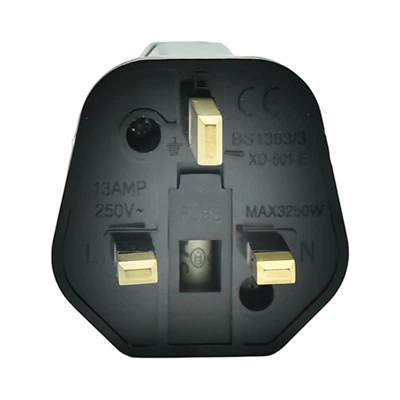
If you’re planning a trip and need the right adapter for your scanner, or you’re a business looking to stock adapters for your traveling employees, get in touch with our team to discuss your requirements. We offer bulk pricing, fast shipping, and products tested to meet international safety standards, so you can travel with peace of mind.
Hardware Fittings References
US Department of Energy. (2022). Electrical Outlets and Voltage Standards Around the World.
International Electrotechnical Commission. (2021). Safety of Information Technology Equipment, Part 1: General Requirements.
Consumer Reports. (2020). Travel Adapters: What You Need to Know Before You Buy.
Foshan Haosheng Technology Co., Ltd.
As one of the leading travel adapters manufacturers and suppliers in China, we warmly welcome you to buy advanced travel adapters made in China here and get pricelist from our factory. All customized products are with high quality and competitive price.
Address: No.4, Jinsha Liansha Shangliang Development Zone Avenue, Danzao Town, Nanhai District, Foshan City, Guangdong Province, China
E-mail: 13925140140@163.com
WebSite: https://www.hssocket.com/
