If you’ve ever walked into a data center, you might not notice the technical floor at first—until it stops working. As a supplier who’s spent 12 years designing and building these spaces for clients from Silicon Valley startups to Fortune 500 financial firms, I’ve seen what happens when corners get cut: server racks overheat, critical network nodes go offline, and clients lose millions in downtime before maintenance teams even spot the problem. The technical floor isn’t just a concrete pad with cables; it’s the backbone of every operation that runs on data, so evaluating its quality isn’t just a checkbox—it’s how you protect your business. Data Center Technical Floor

Over the years, I’ve had to help clients reverse-engineer cheap, poorly built technical floors that failed within three years, costing them twice as much to rebuild. Today, I want to break down the real, practical ways to evaluate a data center technical floor—no industry jargon, no sales pitches, just what actually works when you’re inspecting a space or vetting a new build.
First, let’s start with the foundation: the slab itself. Most people think a concrete slab is just concrete, but there’s way more to it than mixing cement and pouring. For a data center technical floor, the slab needs to handle constant, heavy load—server racks weigh 500 to 2,000 pounds each, and when you factor in cooling units, power distribution units (PDUs), and the weight of raised floor tiles, the total load per square foot can hit 200 to 300 pounds, way more than a standard office building. When evaluating the slab, don’t just ask for a “load rating”—ask for the design load calculation, and make sure it accounts for future expansion, too. A friend of mine runs a regional data center that saved 10% upfront on a slab with a 150 PSF static load rating; when they wanted to add 20 new racks five years later, they had to jackhammer half the slab and reinforce it, costing them $200,000 and two weeks of downtime.
Another critical slab check is the vapor barrier. I once visited a data center in the Southeast that skipped a proper vapor barrier to cut costs, and within two years, moisture from the ground seeped up, rusting steel rebar under the slab and corroding cable trays mounted on the floor’s base. To check this, do a simple test: after the slab is poured, leave a 3×3 foot plastic sheet taped to it for 24 hours. If there’s condensation under the sheet, the vapor barrier is missing or faulty. The slab’s finish matters too—it needs to be non-dusting and able to support heavy equipment without chipping. I’ve seen floors where workers spilled a rack’s worth of server tools, and the slab’s surface dissolved into dust, clogging cooling vents. That’s not a small problem—it’s a avoidable one.
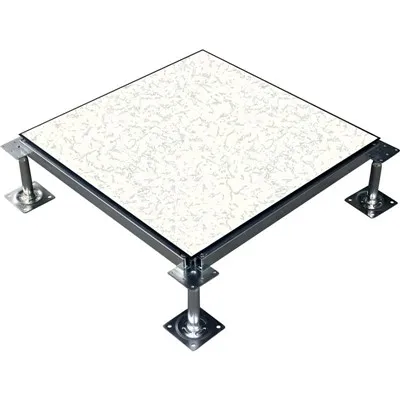
Next up: the raised floor system, which is what most people actually interact with in the data center technical space. Raised floors aren’t just for cable management; they’re the primary way cold air gets distributed to server racks. A low-quality raised floor will have tiles that warp, crack, or shift when you step on them, leading to gaps that let cold air escape where you need it, and get trapped where you don’t. When evaluating tiles, check their load rating—look for at least 2,000 pounds per square foot for standard server zones. I’ve had clients tell me their old tiles felt solid, but when we placed a full server rack on them, the tile flexed ½ inch, which is enough to make the rack’s mounting hardware fail over time.
You should also test the panel pressure. To do this, place a small digital manometer between two tiles and seal the edges, then pump air into the underfloor plenum to maintain a consistent pressure. If the pressure drops more than 10% in 10 minutes, you’ve got leaks—either from warped tiles, poor sealant between panels, or gaps around the edges of the floor near walls or columns. Those leaks might seem minor, but they can reduce cooling efficiency by 15% or more, driving up energy costs month after month. And don’t forget the pedestals that hold the raised floor up. Cheap pedestals are made of thin plastic or low-grade aluminum; look for galvanized steel pedestals with adjustable height, and make sure every pedestal is bolted to the slab, not just resting. I’ve seen entire sections of raised floor collapse because someone skipped bolting the pedestals.
Then there’s the underfloor infrastructure, which is where most of the hidden work happens—power cables, fiber optic lines, and cooling ducts. This is where a lot of the cutting happens. When evaluating this space, start with cable management. The technical floor needs to separate power and data cables to avoid electromagnetic interference (EMI), which can make data packets drop or server performance glitch. Power cables should be routed in dedicated trays, elevated at least 12 inches from data cable trays, and labeled clearly so teams can find a specific line in 10 minutes, not two hours during an outage. I once got a call from a hospital data center where a tech accidentally cut a fiber cable while trying to fix a power line that was running parallel to it; the outage shut down their emergency rooms for four hours, and that’s not a risk anyone can afford.
Cooling infrastructure under the floor is another big one. Modern data centers use underfloor air distribution (UFAD) systems, which deliver cold air directly to the front of server racks. To evaluate this, ask to see the air flow calculation for the floor—does it account for hot spots near racks with high power density? A rack with 10kW of power needs way more cold air than a rack with 2kW, and a quality technical floor will have variable air vents that adjust to that. I worked on a project for a tech startup that planned to add 8 high-power racks, but their original floor’s air vents were fixed at 200 CFM; we reconfigured the plenum to have adjustable dampers, which let them increase air flow to those racks by 30% without upgrading their entire cooling system. Also, check for air mixing in the underfloor plenum—if hot air from the back of racks leaks down into the plenum, it warms up the cold air before it reaches the servers, wasting energy. A simple way to test this is to use a thermal camera to scan the gaps between tiles when the cooling system is running; if you see warm spots, you’ve got air mixing.
Power distribution is the final piece of the underfloor puzzle, and it’s non-negotiable. The technical floor needs to have enough redundant power paths—usually N+1 or 2N—to avoid single points of failure. When evaluating power, don’t just count the number of circuits; check their rating. Each circuit should be labeled for its amperage, and the PDU outlets should match the server power cords (no mismatched adapters that cause overheating). Also, make sure there’s enough spare circuit capacity for future expansion—many clients build a floor with 50 racks, then need to add 20 more two years later and have to rewire half the floor. We always design our floors with 25% spare circuit capacity to avoid that problem, and it’s saved our clients thousands in retrofits.
Wait, there’s one more thing almost no one talks about when evaluating a technical floor: maintenance accessibility. A great floor isn’t just built right—it’s easy to fix when something goes wrong. Last year, we had a client whose data center floor had a section of cable that burned out, but because the cables were routed in a tight, unlabeled tray, it took the maintenance team six hours to find and replace the line. We’d added dedicated pull strings and access panels in all our builds, and that team told us their counterpart at the competitor’s build took three times longer. When evaluating, ask for a walkthrough of the underfloor space with a maintenance tech—if they complain about how hard it is to get to wires or vents, that’s a red flag.
Let me be clear: when I say all this, I’m not just a supplier trying to sell you a new floor. I’ve built floors that failed, I’ve fixed floors that were built wrong, and I’ve learned that the best technical floors aren’t the ones with the fanciest materials—they’re the ones that are built for reliability, scalability, and ease of use. If you’re evaluating an existing technical floor, start with the slab and raised floor pressure, then check the underfloor cable and cooling, then test accessibility. If you’re building a new one, don’t cut corners on the foundation, don’t skip the vapor barrier, and make sure you leave room to grow.
If you’re tired of dealing with technical floors that cause downtime, waste energy, or are hard to maintain, let’s connect. We can walk through your current space, or talk through plans for a new build that fits your needs, no pressure, no sales fluff.
References
Raised Floor American Society of Heating, Refrigerating and Air-Conditioning Engineers (ASHRAE) Data Center Standards.
Telecommunications Industry Association (TIA) Data Center Telecommunication Infrastructure Standards.
Uptime Institute Tier Standard: Site Infrastructure Methodology.
Fineco Tech Co., Ltd.
As one of the most professional data center technical floor manufacturers and suppliers in China, we’re featured by quality products and good service. Welcome to wholesale customized data center technical floor made in China here from our factory. If you have any enquiry about cooperation, please feel free to email us.
Address: Wuyue Square, Wujin District, Changzhou, Jiangsu, China
E-mail: info@finecotech.com
WebSite: https://www.finecoglobal.com/
